T.G.O.D

Taylor Gang Or Die

Ironlak

Ironlak

Roll Up

Smoking Grade A

Wiz Khalifa

Pittsburg Rapper

Tampilkan postingan dengan label Apps. Tampilkan semua postingan

Jumat, 17 Mei 2013

ScanLife Barcode & QR Reader


ScanLife Barcode & QR Reader-1 ScanLife Barcode & QR Reader-2
ScanLife turns your camera phone into an all-in-one, lightning fast QR and barcode reader! Newly enhanced with Facebook to make it easy to share what you find and see what ScanLife users recommend as you’re scanning.
This is the only barcode scanner you need because it scans it all!
Scan any 2D barcode (QR Code, Datamatrix, EZcode) that you find on print ads, packaging, or business cards to launch websites, videos, deals, or contact information.
Plus, scan regular UPC/EAN barcodes from all products, like DVDs, books, and food to see a variety of information and buy the products in just a few clicks:
- Prices from over 30 different online retailers including Amazon, Home Depot, Macy’s, Best Buy, and more
- Local prices to find out if the product is sold near you (US only)
- Millions of customer reviews from Amazon & Best Buy
- Related deals & coupons
- Related accessories
- Nutritional information & ingredients (US only)
- You can even buy the product in a few clicks!
Other features:
- Connect using your Facebook account so you can sync your favorites to your Facebook page. Share what you find with your Facebook network – a great way to suggest a holiday wish list.
- Discover scans happening in real time from around the world. Click on the products to view the information as if you scanned it yourself.
- Use QRcard to create your personalized QR Code with your contact details & share it with others.
- Easily share the content of the QR Code or UPC Code via your Twitter account, or email it to yourself as a reminder of what you found.
- Save all your QR Code & UPC scans in your History, even if you are not connected to the Internet.
- Personalize your experience by choosing from scanning themes like Fighter Jet.
- You can even “scan” images of a QR Code or UPC Code that you have saved to your photo gallery. Great if you want to view the content from a code you received in an email.
Want your own QR Codes? Just go to www.scanlife.com to create your own personal account, or a Business account for more advanced features and QR Code analytics.
- NOTES ON PERMISSIONS -
We take your privacy seriously, so it is important to understand why we ask for certain permissions.
“INTERNET”:
The app connects to the Internet to show content after you scan a barcode.
“ACCESS WIFI STATE and ACCESS NETWORK_STATE”:
The app verifies if a network connection is available in order to connect to the Internet.
“CAMERA”:
The app uses the camera to scan barcodes.
“ACCESS FINE LOCATION”:
Location is used to give you more relevant information like local prices when available. You will be prompted before Location data is used.

Download 

Metal Sniffer – Metal Detector


Metal Sniffer - Metal Detector-1 Metal Sniffer - Metal Detector-2
=== Metal Sniffer: Metal Detector ===
This app detects nearby electromagnetic fields using the phone’s built-in magnetometer/compass. Depending on your phone, you can use it to detect metals up to 15cm away, and magnets from far, far away! Note that household equipment like TVs, and computers or even your phone case can affect readings.
===How to use this app?===
Very simple, just move the app around and read the measurements, if the magnetic field readings go over a critical level, the phone will vibrate, meaning a ferromagnetic material is nearby.
If the readings aren’t getting updated, make sure your phone is equipped with a magnetometer.
If the readings seems to be off, it means that your sensors needs to be re-calibrated, click the re-calibration button (refresh icon) for instructions.
===Features===
-Fun Metal Detector
-Displays the x,y,z components of the magnetic field.
-Works through walls! Detect hidden electrical wires.
-4 Sensor speeds and 3 different units.
-Export the data to a CSV file, make cool charts.
-Compass-like arrow to point out the direction of the source of the magnetic field
-Vibration alarm
-Free (Ads can be disabled in the settings)
-Option to force screen on to prevent screen from closing
-A historical chart
-Optimized for Ice Cream Sandwich/Holo theme
-Russian, Spanish and Dutch translations
-Tutorial (only on Android 4.0+) when app is first launched.
===Notes===
-Works on 2.1 and up!
-Other languages coming soon.
===Permissions===
VIBRATE
Used for vibration when level has reached a set threshold.
WRITE_EXTERNAL_STORAGE
Used to save .csv records to SD card.
INTERNET/ ACCESS_NETWORK_STATE
AdMob ads.
CURRENT VERSION : 0.7.3
REQUIRES ANDROID : 2.1 and up

 Download

SwiftKey Keyboard Free


SwiftKey Keyboard Free-1 SwiftKey Keyboard Free-2
Try SwiftKey free for one month
SwiftKey replaces the touchscreen keyboard on your phone with one that understands how words work together, giving the world’s most accurate autocorrect – and predicting your next word before you press a key.
The keyboard learns as you use it to make corrections and predictions based on the way that you write. It can learn from your Gmail, Facebook, Twitter or blog to make its insights even more personalized. You can also enable up to three languages simultaneously, for true multi-lingual typing.
Switch seamlessly between tapping and gesture typing with our new SwiftKey Flow feature. It combines the mind-reading capabilities of SwiftKey with the speed of gliding your fingers across the screen. With ‘Flow Through Space’, you can also enter entire phrases without lifting your finger from the screen, simply by sliding to the space bar between words.
For video tips and support, visit swiftkey.net
Language support (enable up to three at once):
English (US)
English (UK)
English (AU)
Afrikaans
Albanian
Arabic
Armenian
Azerbaijani
Basque
Bosnian
Bulgarian
Catalan
Croatian
Czech
Danish
Dutch
Estonian
Finnish
French (CA)
French (FR)
Galician
Georgian
German
Greek
Hebrew
Hindi
Hinglish
Hungarian
Icelandic
Indonesian
Irish
Italian
Javanese
Kazakh
Korean
Latvian
Lithuanian
Macedonian
Malay
Norwegian
Persian (Farsi)
Polish
Portuguese (BR)
Portuguese (PT)
Romanian
Russian
Serbian
Slovak
Slovenian
Spanish (ES)
Spanish (US)
Spanish (LA)
Sundanese
Swedish
Tagalog
Thai
Turkish
Ukrainian
Urdu
Vietnamese
###
We take your privacy very seriously. This keyboard does not learn from password fields and all language data learned on your device is stored on your phone’s internal memory or SD card and never transferred.
Internet connection permission is required to install this app, so that language module files and cloud personalization data can be downloaded.

Download 

Advanced Flashlight Led


Advanced Flashlight Led-1 Advanced Flashlight Led-2
Advanced Flashlight Led turns your Android device to a torch.
Advanced Flashlight Led is Incredibly simple and yet very useful flashlight application. Will use your device’s camera LED / flash / screen as a torch It is a must for one who need light.
Advanced Flashlight Led also provides kinds of lights you will like, such as strobe light, rainbow light and police light.
Features:
Brightest, turns on Camera Flash LED at Maximum
Flexible, change the light source, LED or screen, with just one click
All kinds of lights
Morse light morse code strobe
Warning Lights
Beautiful rainbow light and strobe light
Vivid police light with police siren
Bulb light like a real bulb
CURRENT VERSION: 1.1.2
REQUIRES ANDROID: 2.1 and up

 Download

Kamis, 16 Mei 2013

Super Booster – RAM Optimizer


Super Booster - RAM Optimizer-1 Super Booster - RAM Optimizer-2
Simulates a reboot by closing/restarting all core and user tasks and thus frees up memory.Your phone should be much faster after using Super Booster.
NOT Require Root!
Features:
- Closing/Restarting your running tasks in one click.
- Terminate Apps in background and save your battery.
- Closing/Restarting background system processes.
- Free memory to keep your android fast.
- Shows CPU/Memory & Device Info.
- Quick uninstaller.
- Best performance.
- Support android 1.6-3.1
#FAQ
1. How to use it (for new users quick start)?
It is pretty simple. Open this tool and take a look at the running processes? Uncheck some processes you don’t want to be closing/restarting(such as battery manager process) Tap the button ’1-Click SpeedUp’, It will closing/restarting all processes that have ‘nuclear’ sign.
2. Does this app make phone unstable?
It is green software.Not “auto boost” or “running background”. If a special task you don’t want to be closing/restarting, You can mark it as a ‘star’ task. Don’t worry about using this app will damage your phone!
The paid version is on sale right now. It’s called “Super Booster Pro”
Thank you very much for your support!
CURRENT VERSION: 1.2.5
REQUIRES ANDROID: 1.6 and up

 Download

Gallery Vault – Hide Video & Photo


Gallery Vault-Hide Video&Photo
The most beautiful and magic private media protection app — ThinkYeah Gallery Vault (Hide Picture & Hide Video)
Gallery Vault is a fantastic privacy protection app to easily hide your pictures and videos that you do not want others to see.
With a special innovative solution, Gallery Vault can hide its app icon and keep your privacy absolutely safe. It sets up a security space on your phone where you can import your private images and videos. It runs in a stealth mode and the app icon will be hidden so that nobody knows the existence of Gallery Vault.
(You can dial “##your passcode” to launch this app in the stealth mode.)
What’s more, Gallery Vault has the beautiful design, it provides you the smooth and amazing media browse experience.
The magic of Gallery Vault:
– Be INVISIBLE except for you
– Import your private PICTURES and VIDEOS from the phone gallery by Sharing in batches
– Directly take and hide photos and videos in Gallery Vault
– The hidden media files are kept encrypted
– The perfect media browser design, providing the smooth zoom and slide experience
– Support export private media files to SD card
– Support recover files after the re-installation
– Shake your phone to close Gallery Vault in a hurry
Now just download it, begin to enjoy the perfect privacy protection!

Download 

Share Keyboard & Mouse (Beta)


Share Keyboard & Mouse (Beta)-1 Share Keyboard & Mouse (Beta)-2
Share Keyboard & Mouse (Beta)
Control your Droid from your desktop with MOUSE and KEYBOARD. Just like a Synergy.
# ShareKM is a very handy tool for Android that lets you share your computer’s Mouse, Keyboard and Clipboard. You can download PC app at http://goo.gl/khfEb.
# Features list:
+ Control Droid with desktop Keyboard and Mouse.
+ Muti-touch: Drag mouse while pressing ctrl key.
+ Copy a block of text from your computer, paste it on your Droid.
+ Copy some text from your Droid, paste it back to your computer.
+ Shortcuts: Mouse right/middle click(ex Back button on Droid), F1~F12. All shortcuts are fully customizable.
+ Control the device volume with the computer ctrl-down + mouse wheel.
+ Screen on/off control when you switch Android and PC.
# Restriction:
If your device is not ROOTED, you can use only USB connection.
Bluetooth connection : Microsoft bluetooth stack is recommanded.
# Permission explanation:
+ SYSTEM_ALERT_WINDOW: To create cursor layer.
+ INTERNET: To connect with PC.
+ BLUETOOTH_ADMIN, BLUETOOTH: To connect via bluetooth.
+ ACCESS_NETWORK_STATE, ACCESS_WIFI_STATE: To connect via WIFI.
+ WRITE_EXTERNAL_STORAGE: To save settings.
CURRENT VERSION : 1.0.21
REQUIRES ANDROID : 2.3 and up

Download 

Bitdefender Antivirus Free


Bitdefender Antivirus Free-1 Bitdefender Antivirus Free-2
Take Bitdefender’s award-winning antivirus protection with you!
Bitdefender’s Antivirus Free is a powerful and fast solution that uses in-the-cloud scanning technology to arm your Android device with the very latest industry leading virus detection. Without slowing down your Android or draining your battery. Simply install on your Android and it’s ready to go—nothing to configure.
And it’s totally free!
Unparalleled Detection
Autopilot automatically scans any new apps that are downloaded to your Android device for viruses. Antivirus Free uses the same scanning engines as Bitdefender Mobile Security-our flagship mobile security app that has been independently certified to catch more than 99% of all viruses targeted at Android devices. This powerful scanner keeps you protected 24/7 against malicious activities.
Feather-Light Performance
Instead of downloading and storing virus signatures directly to Android devices, Antivirus Free uses in-the-cloud services to check online for the latest safeguards to outbreaks. This not only results in super-fast scans, but in close to zero impact on battery life and device performance.
Hassle-Free Operation
Don’t worry. Ever. You can sleep but Autopilot, a smart on-install scanner that checks all apps for suspicious activity, won’t. Threats and viruses are blocked before any damage is done.
Zero Configuration
Bitdefender Antivirus Free offers you essential antivirus protection against all Android threats. It is ready to go right after installation, acting as an effective guardian against mobile malware. Moreover, the Autopilot automatically scans any new apps you install.
CURRENT VERSION : 1.1.96
REQUIRES ANDROID : 2.0.1 and up

Download 

Rabu, 15 Mei 2013

Fast Burst Camera


Fast Burst Camera
Take up to 30 photos per second with this high-speed camera application
This is the fastest camera app available for Android. Not even the newest iPhones are able to shoot this fast.
Fast Burst Camera is capable of taking 30 photos per second.
( on low-end devices, 5-10 photos per second is possible )

Hold shoot button for continuous burst, or tap for fast single shots.
Zero shutter lag - pictures are taken as soon as shutter button is pressed.

★ Supports flash, focus and zoom. Shutter sound can be turned of.


  • ★ Great for 
  • sports shots
  • pictures of kids or pets
  • party camera 
  • taking a burst of pictures in an important situation, and pick the best later
  • analyse your golf swing frame-by-frame
  • Parkour shots
★ Tips for good burst photos
  • get as much light as possible - especially when capturing things or people in motion
  • keep the camera steady 
  • hold the shoot button for continuous bursts, and pick the good shots later
What's in this version : (Updated : May 12, 2012)
  • Fixed issue with saving photos on some devices
Required Android O/S : 2.2+

Screenshots :


 Download

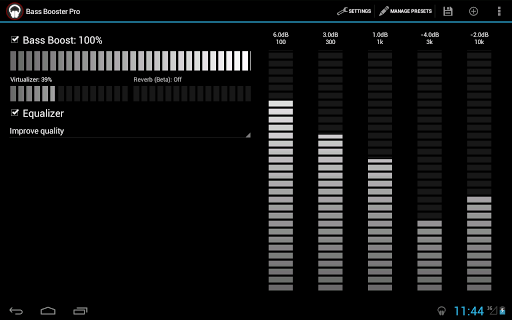
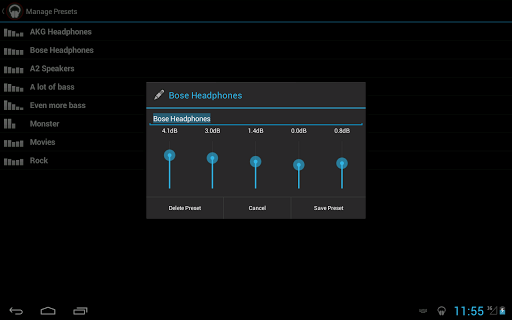
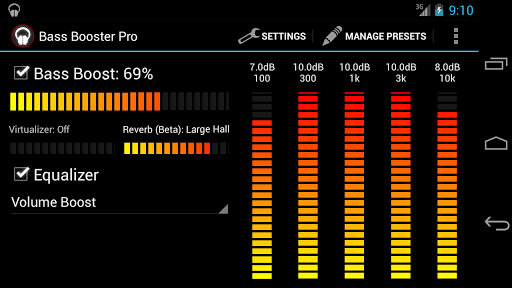
Bass Boost Pro


Bass Booster Pro
It's virtually impossible to get this kind of app to work on every device !
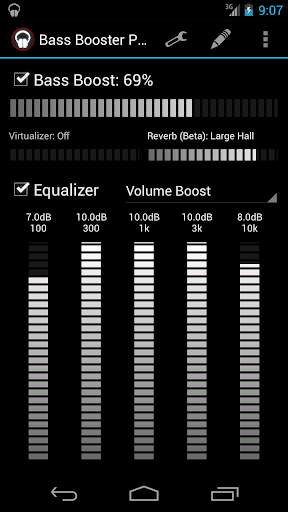
Pro Features :
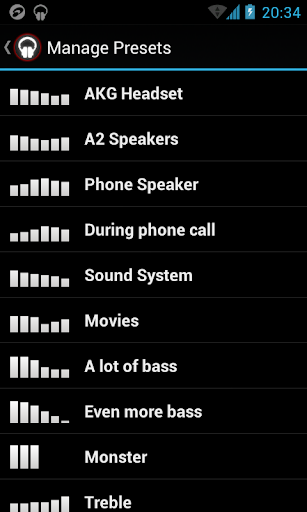
  • Unlimited custom presets
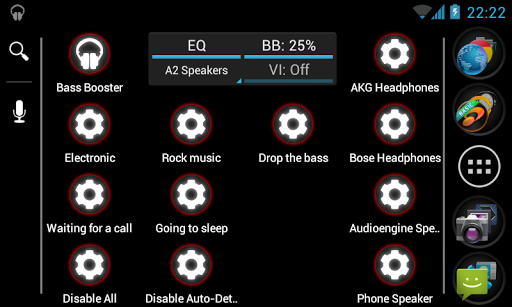
  • Homescreen widget (2x1)
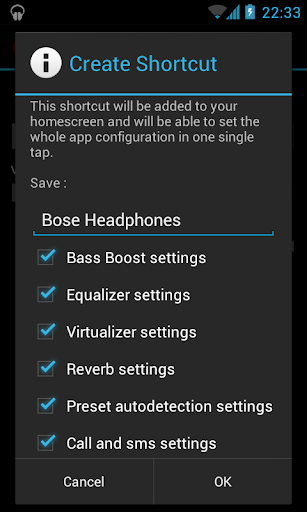
  • Homescreen shortcut (see below)
  • Virtualizer
  • Start on phone boot
  • Preset auto-detection (see below)
  • Automatic preset on incoming call/SMS or during phone conversations
  • 4 themes
  • Reverb (in Beta ! It doesn't work on most phones, so it might be removed)
Please check out the free version to see if it works ! It includes :
  • Bass Booster
  • 6 Bands Equalizer (5 on some phones)
  • 20 Presets (More Basses, Improve quality, Electro, Techno, Dubstep, Dance, Pop, Rock, Metal, Reggae, Rap, R&B, Hip-Hop, Jazz, Latino, Acoustic, Classical, Party, Voice Boost, Volume Boost)
Homescreen Shortcut :
This feature allows you to create a 1x1 homescreen shortcut that'll change Bass Booster settings in one click without even opening the app ! (see screenshots)
The *first* time you use a shortcut, some Android versions launch the app as well.

Preset auto-detection :
This feature allows presets to be automatically adjusted according to the music that is being played. Let's say that you're listening to some Alternative Rock music, by default, Bass Booster will automatically choose the Rock preset, but if you create a custom "Rock" preset, yours will be selected.
But it goes even further, you could create an "Punk Rock" preset ("punkrock" works just as good) and a "Hard Rock" preset to get finer equalizer settings for each genre.
This feature require to use a compatible music player and to have the audio file locally stored and correctly tagged.

Players that support auto-detection :
  • The stock music player by Google
  • Google Play Music
  • JetAudio Player (recommended)
  • RealPlayer
  • Player Pro
  • Poweramp
  • Rocket Music Player
  • NRG Player
  • Music Folder Player
  • MortPlayer
  • TTPod Music Mod
  • Meridian
  • ³ (Cubed)
  • Astro Player 
  • Winamp (for Winamp, enable Scrobbling in Winamp settings and install the Last.FM app).
  • DoubleTwist (enable Last.FM scrobbling in DoubleTwist settings)
This list is NOT complete : others media players may work.
If your player doesn't work, just drop us a mail and we'll see if support can be added.
If auto-detection doesn't work, try to enable Last.FM Scrobbling in the settings of your media player. (For Winamp and some others players, you have to install the Last.FM app)

What's in this version : (Updated : May 13, 2013)
  • New feature : preset auto-detection based on title/album or artist
  • Added permission "Read external storage" to fix bug
Required Android O/S : 2.3+

Screenshots :


Download